You might be in the market for a new camera with great night vision, or perhaps unhappy with your existing cameras night vision. Crime often happens at night, so getting a camera that gets good visuals at night is essential.
In the article, we talk about the different types of night vision, and how to determine which cameras have good night vision.

by Bryce Whitty
started ProtectFind to help people get the right security system for their goalsBryce is a registered Security Advisor who started ProtectFind to help people get the right security system for their goals.
1
Types of Camera Night Vision
Infrared Security Cameras
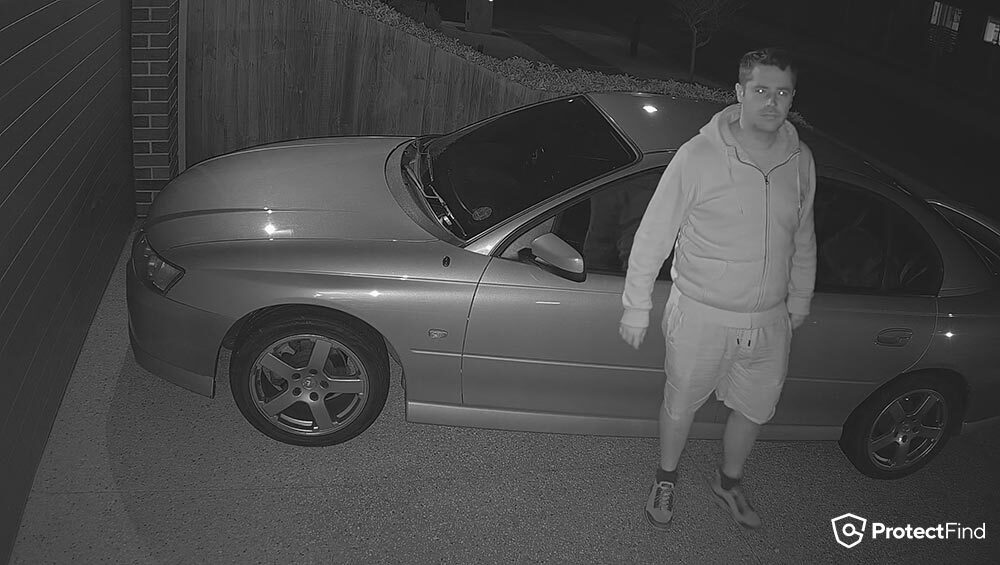
Infrared night vision creates black-and-white footage that will capture more fine details of a person or vehicle than colour night vision. Infrared security camera systems can work in complete darkness, and it does this by emitting an infrared light that is invisible to humans.
Infrared will provide the sharpest image at night but lacks colour information. Like the colour of the shirt a thief was wearing or the colour of the car they were driving.
Colour Night Vision Cameras
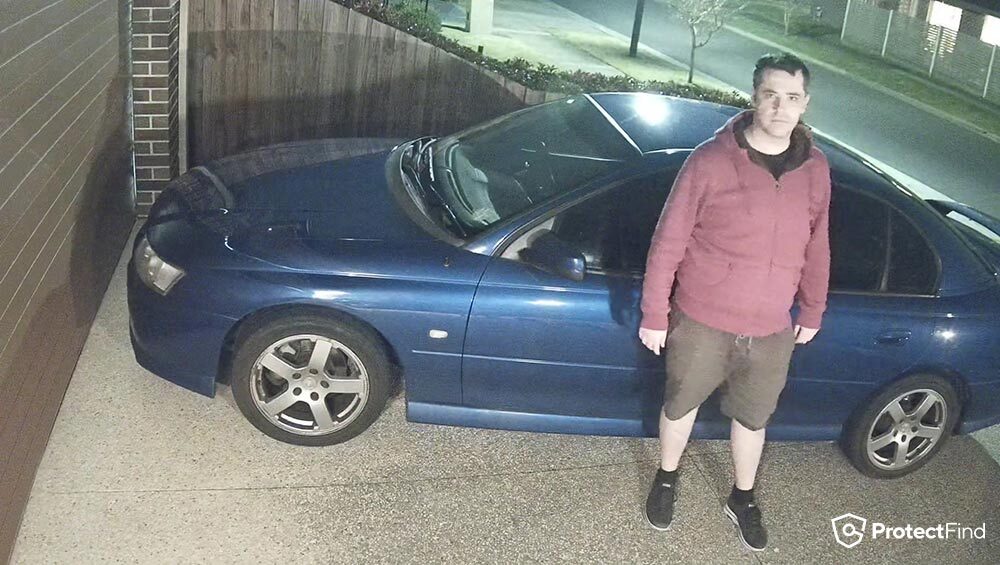
Colour night vision will produce an image in colour, so you could see what colour clothes the person was wearing or what colour the car was. However, colour night vision tends to be blurrier than Infrared.
You can describe what a thief was wearing or what colour car they drove with the colour information. But finer features such as facial details won't be as sharp as infrared.
Colour night vision needs some light to work; it won't work in total darkness. My own security cameras have colour night vision, but my street is too dark for them to work. I had to use an additional light on a stand to create the picture below.
Another benefit of colour night vision is if it's not using any lights, it won't attract insects.
2
How Do Night Vision Cameras Work?
How do Infrared Night Vision Cameras Work?
Infrared night vision works like a spotlight to light up an area, but instead of it blasting visible light, it is invisible to humans.
We can usually see faint red lights coming from the LEDs on the camera. That said, not all night vision cameras have red lights visible. Some trail cameras have no or "low glow" infrared lights.
The footage Infrared night vision creates is black and white because humans can differentiate between black and white much better than we can between colours.
How do Colour Night Vision Cameras Work?
Colour night vision is just cameras getting better at operating in low light as the technology progresses. Without some ambient light for it to work with, it won't work at all. So you cannot use it in total darkness. Some colour night vision cameras supplement the available light with their own LED's which need to stay on all night.
3
Watch Out for Colour Night Vision Examples
There is a ton of B.S surrounding in the marketing of good night vision cameras.
I see example footage of colour night vision footage with beautiful streetscapes, or even just a random Youtubers backyard. The colours are vivid, you can see a ton of detail, and it really looks great.
But none of it matters unless there is an object (ideally a person), moving through the scene in the footage.
Some camera manufacturers "cheat" to make their colour night vision images look really good. They lower their shutter speed to let lots of light in, practically turning night into day. However, if something moves through the scene it will be blurry and ghost-like making it difficult to identify fine features, despite how beautiful it looks.
Additionally, some examples are so well lit that it might as well be daytime and does not demonstrate the camera's nighttime capabilities.
Whatever sample footage you watch, make sure it shows a person moving through the scene in colour night vision mode. That is the true test.
4
Camera Sensor Size
One of the Most Important Factors for Good Night Vision
It is amazing how little attention the image sensor size gets on sales pages.
The size of the sensor on the camera plays a huge part in the quality of the cameras night vision, yet most consumer brands don't even mention it on their sales pages.
Ignore the Marketing B.S, Look at the Specifications
Many brands show these wonderful, bright and clear pictures of nighttime colour, but much of it is misleading.
One of the best ways to check and compare is to go into the camera specifications and see the sensor size. You will often find it on the "Specifications" page or the product PDF you'll have to download.
From the Dahua specifications PDFs:

From the Reolink website on the "Specs" tab:

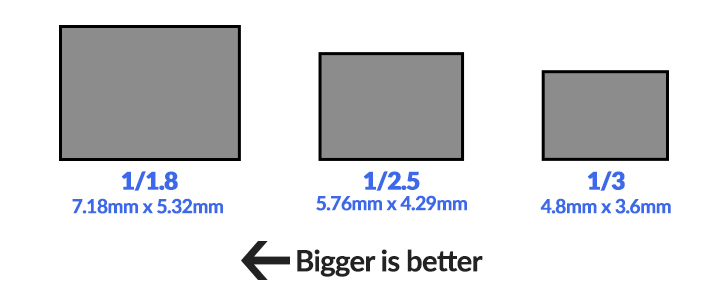
The Large the Sensor, the Better the Camera can See at Night
When we think of electronics, we are trained to believe that the higher number is better or an upgrade. For example, the iPhone 13 is better than the iPhone 12.
But camera sensors are in "Fractions of an inch", so a LOWER number is better.
The Dahua 1/1.8" sensor is better (larger) than the Reolink 1/3" sensor in the images above.
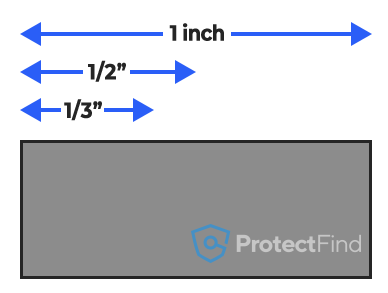
Time to remember our fractions:
- 1/1" is just one inch.
- 1/2" is half an inch
- 1/3" is a third of a inch
So half (1/2") is larger than a third (1/3") of an inch.
That's not so hard, but camera sensors are often not in whole numbers.
So it gets a little confusing. You are more likely to see:
- 1/1.2" (BEST - almost an inch)
- 1/1.8" (nearly half an inch)
- 1/2.8" (nearly a third of an inch)
- 1/3" (WORST - a third of an inch)
Actual Security Camera Sensor Sizes Example:
So What Size Sensor Should I Get for Good Night Vision?
For good night vision, you will need a larger sensor the higher resolution you go:
- For 2MP (1080p), you'll want at least a 1/2.8" sensor
- For 4MP (2K), you'll want at least a 1/1.8" sensor
- For 8MP (4K), you'll want at least a 1/1.2" sensor
The camera sensor is one of the first parts that budget security camera brands will reduce in quality.
Almost all consumer brands do not meet these recommended minimums. Some models of Prosumer brands do.
5
Lower Resolutions
"What?! I thought a higher resolution was better?". In the day yes, at night, not so much.
People generally see the higher resolution number as being better and will jump straight to 4K as the "best" resolution to get.
However, 4K actually performs worse at night than lower resolutions (all other things are the same).
An 8MP (4K) camera has eight times the pixels as a 2MP (1080p) camera.
That means that you have 8 million pixels are trying to absorb the same amount of light as the 2 million pixels in the 2MP camera.
Since the amount of light in the area is the same for both cameras, the 2MP camera is getting more light per pixel since it has to divide it over fewer pixels, resulting in a lighter image.
This is why many security camera enthusiasts choose 4 Megapixel (2K) cameras over higher resolution 8 Megapixel (4K) cameras.
4 Megapixel cameras have a high enough resolution for good daytime quality and a low enough resolution for good nighttime quality.
6
Low Light Technologies Make Buying Easier
The above is all very technical, but some product lines have all the specifications they need to be good at night vision. Big sensors and software designed to handle low light well.
The most well known low light product lines are:
- Hikvision ColorVu (for distances less than 20 metres)
- Hikvision Darkfighter (for distances more than 20 metres)
- Dahua Starlight (usually a little bit cheaper than Hikvision options)
7
Useful Night Vision Features
Infrared Light Range
Most manufacturers of any camera grade mention the "IR Distance". This is a rough guide on how far the camera can illuminate an object in its infrared mode. But don't get confused with IR range and Identification range. While it may illuminate a person at 10 or 50 metres, it doesn't mean you will have the appropriate level of detail to make out facial features.
Smart IR
So more infrared light is better? To see objects in the distance, yes. But it can become a problem when an object is up close.
An infrared security camera will likely emit infrared light at its maximum intensity to illuminate objects as far away as possible.
However, this light is too powerful when an object like a person is close to the camera, resulting in them getting overexposed and just becoming a white shape.
Here is an example of a camera without Smart IR:
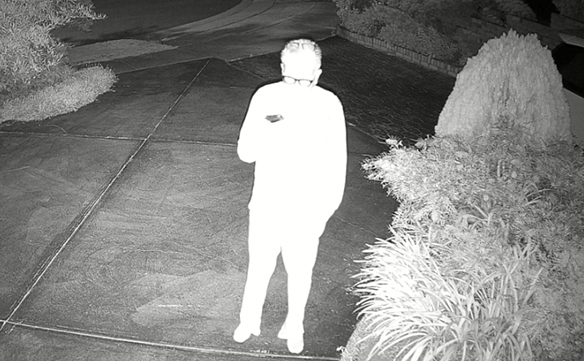
Cameras with SmartIR can "turn down" their infrared light to the appropriate level depending on how washed out the object is. When that object leaves, the IR LEDs will return to maximum power again.
8
Add Some Lights
All cameras work better with more lighting, whether that is visible light or infrared light. Here are a few different options to improve your footage:
White Light LED
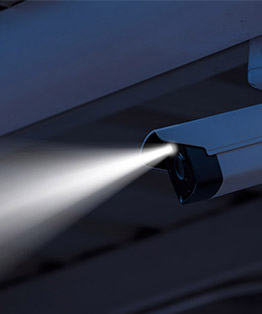
Some CCTV cameras have built-in white light LEDs for use in low light conditions. These can be set to be always switched on, or only turn on when it detects motion which can also act as a deterrent.
IR Illuminator
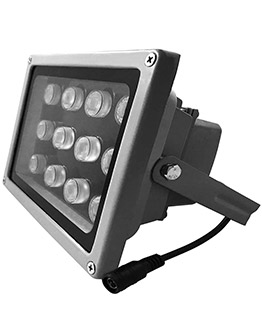
You can supplement infrared security cameras with extra infrared lights. These are known as IR Illuminator Lights which brighten up a scene and possibly allow you to see further. These are good to use when you want your cameras to be more covert or not to annoy yourself or neighbours with constant white light.
Some will shoot IR light in a wide pattern like a floodlight, while others are more focused, like a torch or spotlight. An additional benefit of IR illuminator it allows you to turn off the Infrared lights on your camera, keeping bugs away from the camera.
More Outdoor Lighting
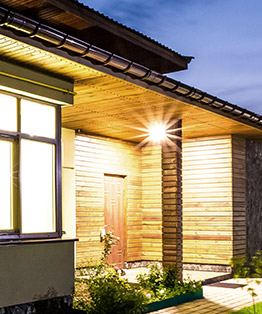
The better lit an area is, the better a camera will work at night. Any regular floodlight, downlights or garden lights will help you get a better picture at night, in both colour and infrared night vision.
9
Common Night Vision Problems
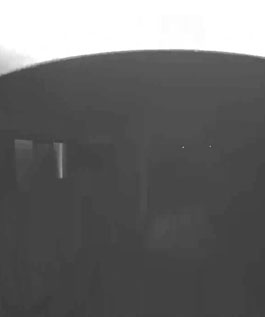
Strong light on an eave or wall, and everything else is dark
This is known as "IR bounceback", where the infrared light bounces back off a nearby object and blinds the camera. Because the camera is trying to tone down the intensely bright light off the wall or eave, it makes everything beyond it dark.
Some possible solutions to this are to point the camera further away from the wall or the eave or move nearby objects.
Pink Security Camera Image
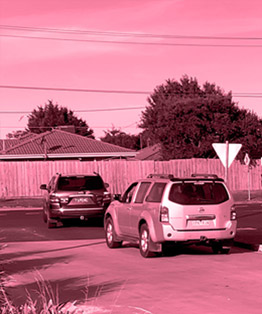
Many factors that can cause this to happen like bad software, cold environments, or dirt getting into the camera. What is happening is security cameras use a physical piece of pink filter called an "IR Cut Filter" to block out Infrared light during the day because it distorts the colours. The camera then physically moves this pink IR filter out of the way so it can see Infrared light at night.
When the pink filter gets stuck in position at the wrong time, your footage appears pink.
Some possible solutions are rebooting the camera, updating its firmware, bringing it in from the cold, or giving it a gentle tap to dislodge the stuck filter.
10
Frequently Asked Questions
Why is my security camera blurry at night?
If a moving object is blurry, it is possible the shutter speed is too slow. A slow shutter speed lets in more light, making the scene more bright. A faster shutter speed makes moving objects less blurry. Some brands allow you to increase the shutter speed, such as Dahua, Hikvision or UNV. But most consumer brands cannot. You can however add more light.
Do Hikvision cameras have night vision?
Some Hikvision cameras have Infrared night vision so they can see in almost complete darkness. Some have a LED light to brighten up the area and see better at night. This is common for colour night vision camera.
Some Hikvision cameras have one or the other, but a few have both IR and LED.
Can Infrared night vision see in pitch black?
Yes, a camera with infrared can see in complete darkness. Colour night vision cannot.
How do you reduce IR glare?
It depends what the IR is hitting. In most cases with cameras, the IR is hitting a close object like a wall or an eave. The easiest fix is to simply turn the camera away from the wall, or down from the eave. If it is a doorbell camera, you can buy wedges that allow you to mount it on an angle for most brands.
How do I improve night vision on my cameras?
Make sure that the infrared light is not hitting a nearby eave or wall, as that can "blind" the camera and make it see worse at night.
All cameras benefit from more light, so add more lighting to the scene if possible. However, keep the actual lights directly out of the cameras view.
11
Get It Professionally Installed
Good night vision can be tricky; you need the right hardware positioned in the right location. Speak to a licensed security installer to recommend the right product and location.
Hopefully, that clears up some of your questions about night vision security cameras. If you still have any additional questions, you can email us here, and I'll be happy to answer them.
Or you can join our Facebook group, and I'll be happy to answer any questions there.